Kristian Gorenc Z
Jan 13, 2026

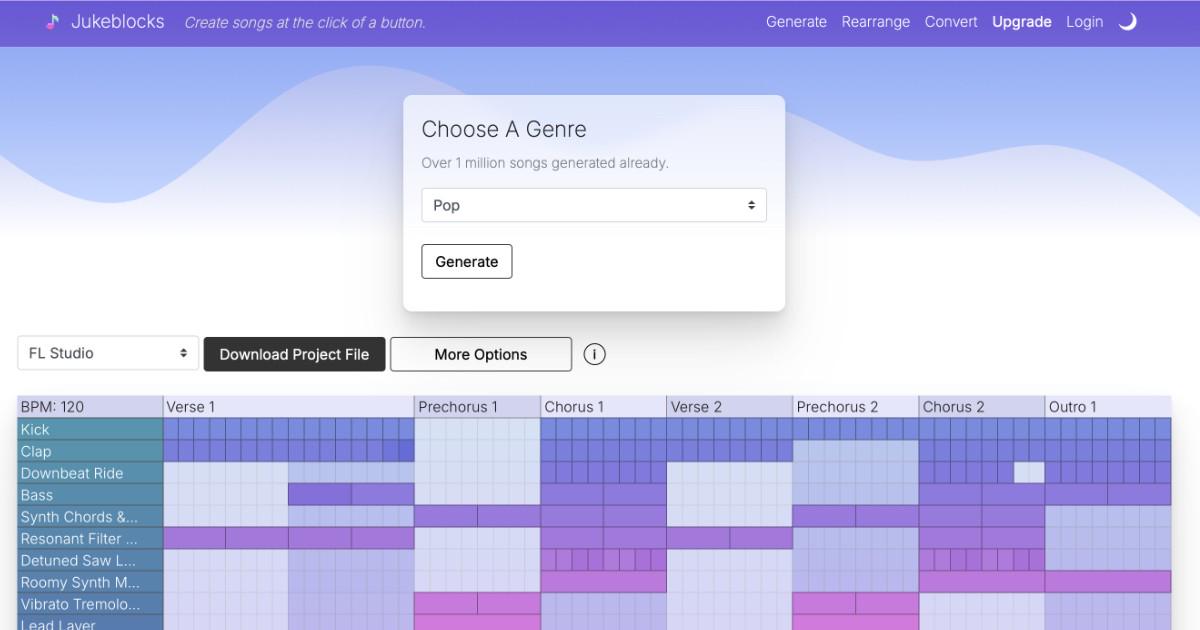

Finishing songs is one of the hardest parts of music production. Many producers have strong ideas, short loops, or half-finished projects that never turn into complete tracks. Jukeblocks was built to solve these problems by focusing on song structure, workflow, and compatibility across DAWs.
Jukeblocks combines three tools that address the most common roadblocks producers face when trying to finish music: generating structured ideas, rearranging existing material, and collaborating across different DAWs.
Song template generator, this helps producers avoid starting from an empty project. By choosing a genre, producers can generate a complete song arrangement with clearly defined sections such as intro, verse, chorus, bridge, and outro. Each generated idea follows real genre based song structure, giving producers clear direction instead of a random loop. The interactive grid shows when different elements should enter and drop out, and producers can click cells to turn parts on or off and shape the arrangement. Because each result follows real song structure, many producers use this tool both to finish tracks faster and to learn how different genres are typically arranged.
Generated templates can be exported as a project file for major DAWs like FL Studio, Ableton Live, Logic Pro, Studio One, Reaper, LMMS, and Bitwig Studio. There is also the option to generate chords, basslines and melodies to play with custom made samples and presets to fit your genre of choice. Many producers generate multiple variations, keep the strongest sections, and combine them into a finished song.
The rearranger is designed for producers who already have material but struggle with structure. You can upload an existing FL Studio or Ableton Live project, one that only contains a short eight-bar loop, and Jukeblocks will reorganize it into a full genre-based song arrangement directly inside the project. The Rearranger analyzes existing tracks and clips and applies a proven structure for the selected genre. It can optionally add new tracks, generate additional MIDI patterns from your existing material, and place either detailed or simplified section markers. You can also keep your original arrangement intact and place the new structure after it, making experimentation safe and reversible.
The DAW Converter makes collaboration easier by converting entire projects between FL Studio and Ableton Live and vice versa. It converts MIDI, audio clips, automation, mixer routing, and third-party plugins so projects open cleanly in the target DAW. It also supports downgrading newer Ableton projects to older versions, handling relative sample paths for easier sharing, AU to VST conversion, and Serum preset downgrading. This allows producers to collaborate across different DAWs and versions without rebuilding projects from scratch. It also allows you to explore your written song in one DAW in an entirely different environment, which can be a major creativity booster.
Together, these tools help producers move from ideas to finished songs faster while keeping full creative control over sounds, plugins, and final production decisions. Get started now: https://jukeblocks.io
Source of music data: Viberate.com
-
📌 Viberate Analytics gives you the data behind the music industry. Built for A&R teams, managers, labels, and artists, it helps you find new talent, analyze audience insights, track Spotify playlists and stats, evaluate tracks and songs, and monitor Spotify, YouTube, streaming, and radio airplay analytics — all connected in one system.
 Next article
 Previous article
11M+ artists, 100M+ songs, 19M+ playlists, 6K+ festivals and 100K+ labels on one platform, built for industry professionals.