Matic Magister
Oct 14, 2026

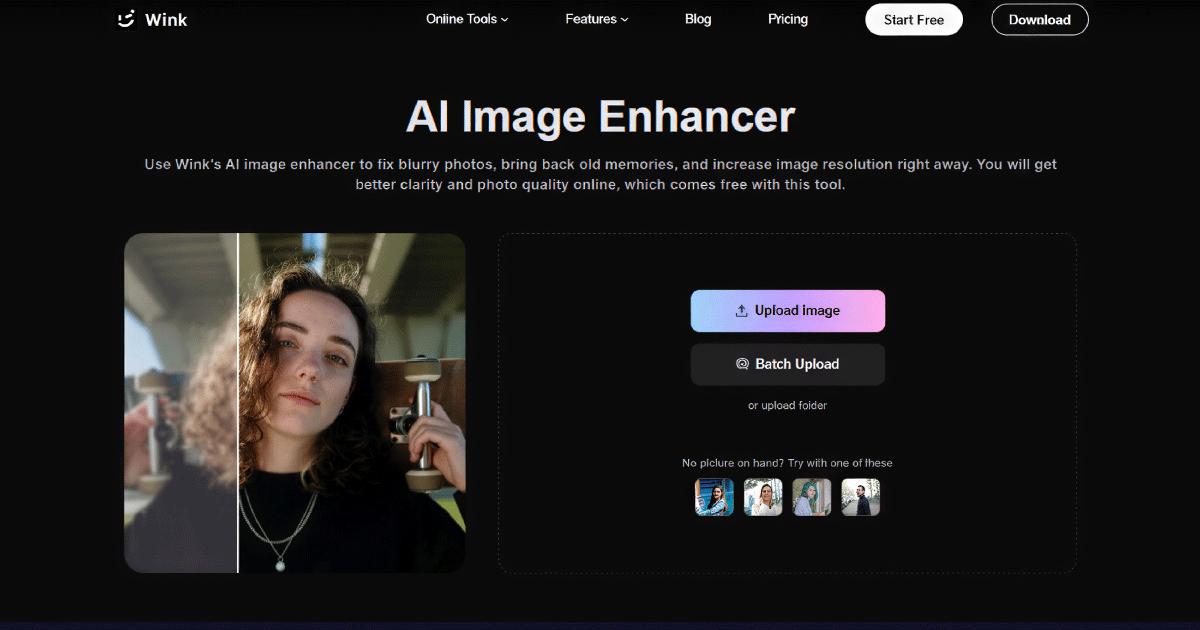

Have you ever recorded a precious moment only to find the video blurry? Many people struggle with the same issues while working with phone footage, old memories or low quality images.
Many editing tools require editing skills to restore the videos. Some tools improve quality but make the videos unnatural. People often look for an easier way to restore visual content while keeping it clear, realistic and ready to share.
In this article, we'll review Wink AI Video & Photo Enhancer. You'll also discover the standout features, real world performance, advantages, limitations and the simple steps to use the tool.
Wink is an online AI video & photo editor tool which helps you to improve the quality of photos and videos with Artificial Intelligence. The tool refines the blurry footage, repairs old visuals, improves colors and raises resolution. You don't need any editing experience to use this tool.
The content creators, ecommerce sellers, photographers, marketers and students can use this editing software. You can also prepare social media posts, product images, family memories or short promotional videos.
Many photos and videos lose quality due to poor lighting, camera movement and low resolution. Wink solves these common problems through an easy workflow.
The tool makes your everyday content clearer and more polished before you share or store it.
Many AI editing tools focus on only photos or videos. Wink brings both into one workflow. You can improve different types of visual content easily without switching between multiple applications. The tool is designed for everyday tasks instead of complicated editing projects.
It is difficult to watch the low quality videos as they appear soft and blurry. Wink analyzes each scene using Artificial Intelligence. The tool improves clarity while keeping the footage natural.
You can also adjust the details to make your videos look cleaner when shared on social media or used for business content.
Small details can disappear after taking photos in poor lighting or with older devices. Wink image enhancer improves image sharpness, balances colors and enhances clarity.
The tool makes the portraits, product photos and everyday pictures look more refined without extensive manual editing.
Old recordings and damaged clips lose detail over time. Wink restores these videos as it improves visibility and reduces common quality issues. The tool makes family memories, archived footage and older digital files easier to watch again.
Videos which are recorded at lower resolutions do not look clear on modern displays. Wink increases video resolution to HD or higher and makes footage appear sharper. The tool preserves important details instead of simply stretching the original file.
The videos recorded at night time and dimly lit surroundings appear pixelated and washed out. Wink reduces the visible noise and improves the brightness, contrast and color balance. The tool makes the videos easier to view without changing their natural appearance.
Portrait editing tools help you to improve selfies and profile photos with simple adjustments. You can refine skin appearance, facial details, hair and other features while keeping the final image realistic.
Creative styles offer another way to transform visual content. Wink includes AI effects that allow you to experiment with different artistic looks. The tool gives photos and videos a fresh style without requiring design experience.
To understand the performance better, we tested Wink with different types of photos and videos that need improvement before sharing or saving.
A short phone video recorded while walking can appear soft, with reduced detail around faces and background objects. Small movements also made the footage look less clear on a larger screen.
As we applied Wink's AI Video Enhancer, the overall quality improved noticeably. The tool made facial details easier to recognize and sharpened the edges.
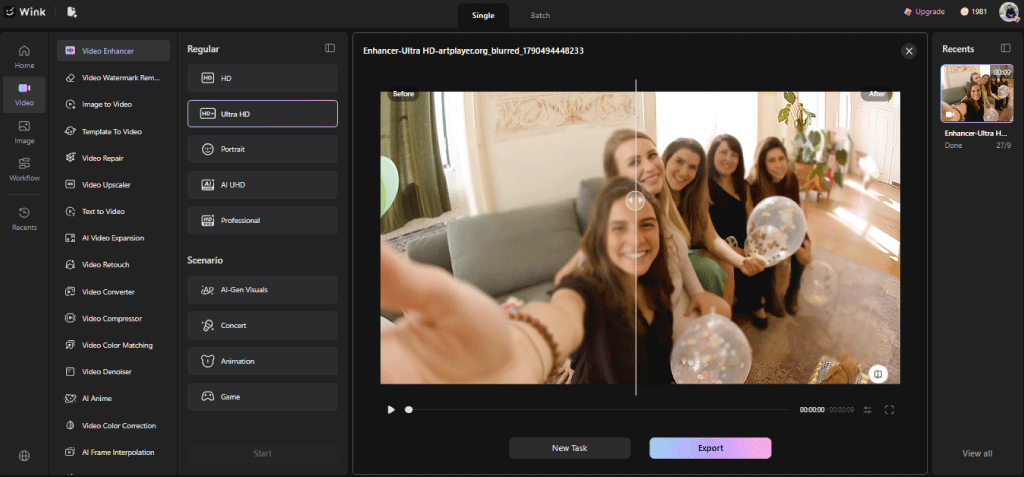
The video appeared cleaner without creating an unnatural result. The result remained balanced instead of looking overprocessed.
We tested an old family photograph that had faded colors, soft details and visible signs of aging. The facial features were not visible clearly because of the original image quality.
Wink restored much of the missing detail while improving color balance across the image. The restored version maintained a natural appearance rather than looking artificially generated.
We also tested a video captured during the evening that contained visible grain and lacked detail in darker areas. Colors also appeared dull, making the recording less suitable for sharing online.
The enhancement reduced much of the visible noise and improved brightness without washing out the scene. The tool made the colors appear more balanced and important subjects became easier to recognize.
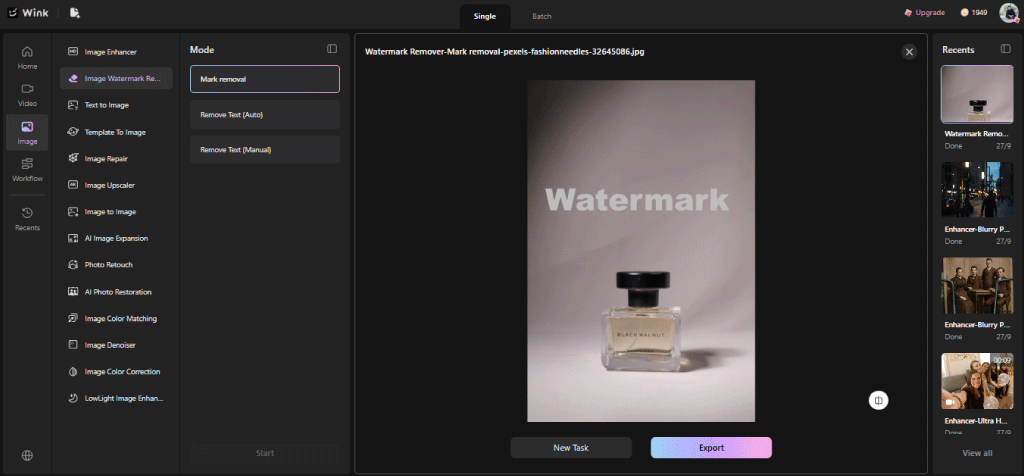
We also tested a short promotional clip containing a watermark placed across one corner of the frame. The text distracted from the main subject and reduced the overall presentation.
The AI Watermark Remover successfully removed the unwanted element while keeping the surrounding area clean in the tested clip. The edited section blended well with nearby details, although more complex backgrounds may still require a closer review after processing.
Every editing tool has strengths and limitations. After reviewing its features and testing common enhancement tasks, Wink delivered reliable results for everyday photo and video improvement.
Pros
• Simple interface that allows beginners to enhance photos and videos without learning professional editing software.
• Improve blurry videos and low quality images while keeping important details natural
• Support multiple enhancement tools, including video upscaling, watermark removal, color correction and noise reduction
• Process both photos and videos, making it useful for creators, businesses, students and personal projects.
• Batch processing helps you improve multiple files more efficiently when working with larger collections
• Support common file formats and provide a straightforward workflow from upload to export
Cons
• Processing time may increase when enhancing longer videos or higher resolution files.
• Certain advanced features or higher quality exports may require a paid plan, depending on the selected workflow.
Wink keeps the editing process simple, even for first time users. Most enhancements only require a few steps before the final file is ready to download. Here is step-by-step guide to use Wink AI:
Step 1: Upload
Firstly, you need to upload the file that needs improvement. Wink supports common photo and video formats. The tool also supports batch upload feature to upload multiple files at the same time.
Step 2: Enhance
You should choose the “General” or “Scenario” to select options based on the editing.
Step 3: Export
Review the final image and save the enhanced results if you're satisfied. Now, the file is ready to share on social media, business use and personal storage.
You can improve everyday photos and videos by using Wink AI Video & Photo Enhancer without any professional editing skills. We tested the tool to restore blurry footage, improve old photos, reduce noise and remove watermarks.
Wink AI Video & Photo Enhancer helps you create better social media posts, restore family memories or improve business visuals. The tool is easy to use for beginners and experienced users.
Test Wink AI with your personal photos and videos to see how its AI enhancement features perform in real situations.
Source of music data: Viberate.com
-
📌 Viberate - Music Intelligence is the data & AI layer behind music analytics, connecting artist discovery, audiences, playlists, tracks, Spotify, TikTok, YouTube, streaming, and radio airplay.
 Next article
 Previous article
11M+ artists, 100M+ songs, 12M+ playlists, 6K+ festivals and 100K+ labels on one platform, built for industry professionals.