Matic Magister
Aug 20, 2026

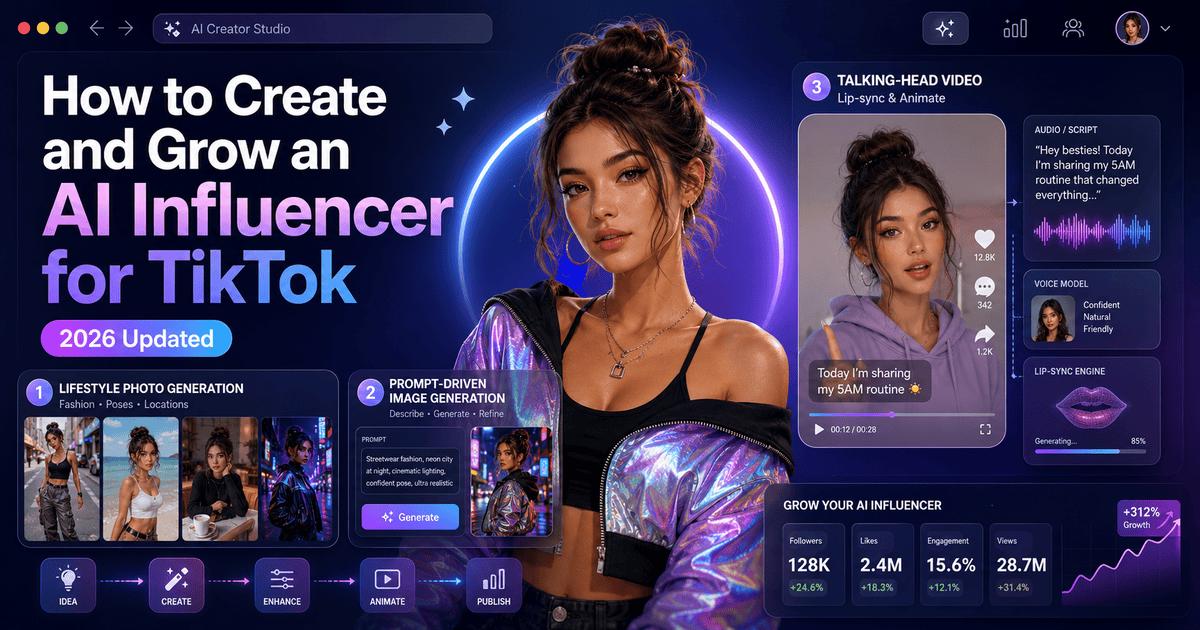

Running a successful TikTok account requires constant output: setting up studio lighting, planning outfits, filming dozens of takes, and editing late into the night. For solo creators and digital agencies, this relentless production schedule often leads to creator burnout.
This is why virtual avatars are reshaping the creator economy. By leveraging an ai influencer generator, marketers can design a consistent digital persona and automate a scalable TikTok content pipeline entirely from a web browser. Here is a practical breakdown of how these persona engines work, key platform requirements, and three distinct generation workflows.
How Do AI Influencer Generators Work?
The primary challenge in virtual persona creation is maintaining visual identity. Without dedicated locking mechanisms, generative models produce a different face with every new render.
An ai influencer generator solves this by capturing core facial geometry—such as cheekbone structure, eye alignment, and jawline proportions—and anchoring them into a persistent baseline profile. Once this digital identity is established, the generator seamlessly maps the locked character across diverse outfits, background environments, and lighting scenarios while maintaining visual continuity on your TikTok feed.
Essential Elements before Building an AI Influencer
Before launching a virtual creator, establish these core foundation blocks:
How to Create an AI Influencer for TikTok: 3 Workflows
Method 1: Photo & Fashion Model Workflows (Lifestyle Image Batching)
For creators focused on building a virtual model for lifestyle feeds, outfit try-ons, and visual branding, dedicated image generators offer the most streamlined path. Using BeautyPlus and its specialized ai influencer generator, you can define a digital face and deploy it across consistent photo assets without manual prompting.
Step 1: Define Visual Features or Upload Reference Photos
Open the BeautyPlus AI Influencer tool. Customize your character using preset attributes like hair and pupil colors, or navigate to the Advanced tab and click Add references to upload existing facial photos as your master profile.
Step 2: Anchor Face Identity and Save Character
Click to generate your custom influencer. The system anchors the facial proportions to your library, keeping the character’s identity locked for future renders.
Step 3: Render Across Lifestyle Outfits and Export
Apply your locked persona directly to pre-designed fashion looks and scene templates to output a month's worth of TikTok photo posts in minutes.
Method 2: Multi-Modal Command Workflows (Prompt-Driven Precision)
For creators who require distinct artistic aesthetics or complex cinematic lighting, general-purpose generative engines offer deep creative control through precise text syntax and parameters.
Step 1: Draft a Baseline Persona Prompt
Write a detailed prompt describing your character's facial structure, hair style, lighting conditions, and camera parameters (e.g., a 24-year-old female lifestyle creator, subtle skin texture, soft window lighting, 85mm lens). Render variations until you lock in a solid base face.
Step 2: Apply Character Reference Tags
Copy the image URL of your baseline render. In subsequent prompts, append character reference commands (such as --cref [IMAGE_URL]) to force the engine to maintain facial features across different outfits and poses.
Step 3: Prepare Renders for Motion Tools
Export your consistent high-resolution stills, which can then be passed into video motion software to introduce subtle camera pans or background motion.
Method 3: Video & Lip-Sync Pipelines (Talking Avatar Synthesis)
When your TikTok strategy centers on talking-head videos, storytime vlogs, or trending audio clips, dedicated video animation engines provide full speech synthesis and gesture mapping.
Step 1: Upload Your Anchored Character Portrait
Take a high-resolution frontal portrait generated from your persona studio and import it into the video synthesis platform as your master avatar anchor.
Step 2: Add Script, Voice Cloning, or Audio Tracks
Input your video script or upload an audio file. Use built-in AI voices or voice cloning features to give your virtual influencer a natural, consistent speaking voice in over 40 languages.
Step 3: Sync Lip Movements and Animate Gestures
Run the generator to automatically align facial landmarks, sync lip movements, and apply natural gestures (such as head tilts or subtle hand movements). Export the final MP4 file directly to TikTok.
FAQ
1. Can I monetize an AI influencer on TikTok?
Yes. Virtual creators generate revenue through brand sponsorships, affiliate marketing, and platform creator funds. Ensure compliance with regional platform guidelines regarding AI content disclosures.
2. How do I fix character drift and stop my AI model from changing faces?
Character drift happens when you rely on unanchored text prompts for every new image. To keep your virtual persona looking consistent across different outfits and angles, use tools with built-in face-anchoring parameters or character reference tags. These systems lock the core facial geometry into a master baseline profile so every new render stays recognizably the same person.
3. Do I need an expensive PC to create and manage a virtual influencer?
Not at all. Modern AI influencer generators run entirely on cloud-based servers, handling all the heavy processing and video rendering remotely. As long as you have a stable internet connection, you can manage your entire content pipeline from a basic web browser on any standard laptop.
Final Thoughts
Building a virtual influencer is not about fabricating reality; it represents a more efficient approach to short-form video production. By treating your digital persona as a reusable brand asset, you can spend less time managing production logistics and more time capitalizing on emerging TikTok trends.
Source of music data: Viberate.com
-
📌 Viberate - Music Intelligence is the data & AI layer behind music analytics, connecting artist discovery, audiences, playlists, tracks, Spotify, TikTok, YouTube, streaming, and radio airplay.
 Next article
 Previous article
11M+ artists, 100M+ songs, 12M+ playlists, 6K+ festivals and 100K+ labels on one platform, built for industry professionals.