Kristian Gorenc Z
Jul 31, 2026

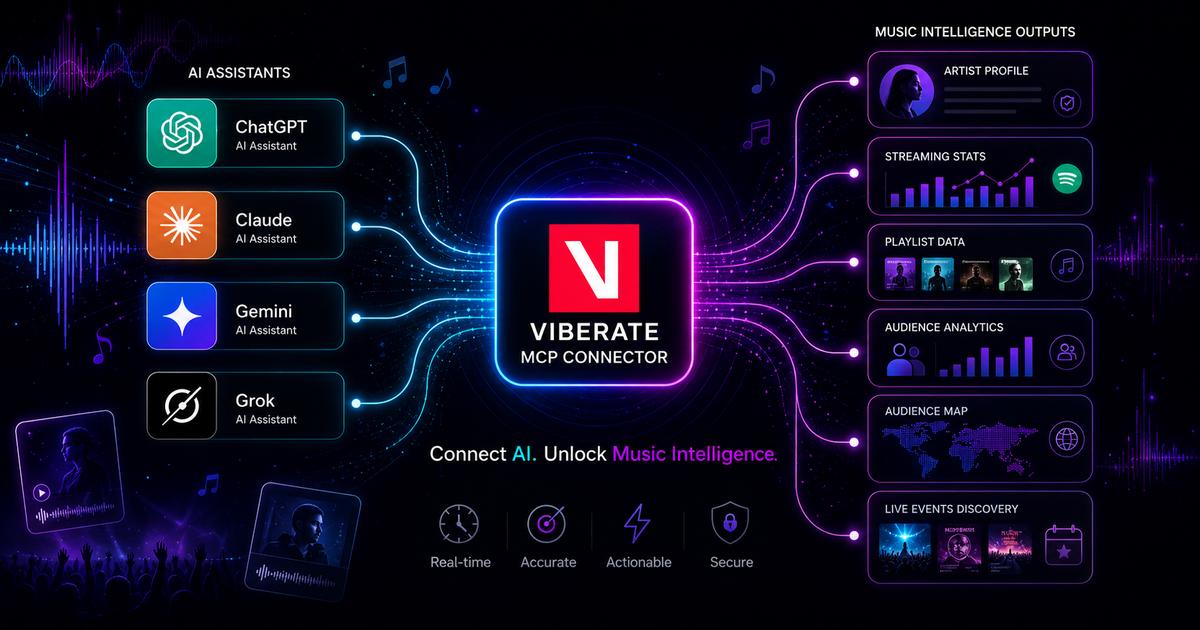

Claude is already useful for research, summaries, planning, and structured thinking. For music professionals, the next step is connecting it to reliable music data. That is where becomes relevant.
A Claude MCP setup lets Claude connect to an external data source through the Model Context Protocol. Instead of working only with general AI knowledge, Claude can request information from a connected service and use that information when answering. For Viberate users, this means Claude can work with Viberate’s music data and help answer questions about artists, tracks, playlists, audiences, labels, charts, events, and markets.
This matters because music industry questions are rarely simple. A manager may want to compare an artist with similar acts across streaming, playlisting, and audience locations. An A&R team may want to find rising artists in a specific country and genre. A brand team may want to check whether an artist’s audience fits a campaign. With the right connector, Claude can become a more useful place to start that research.
MCP stands for Model Context Protocol. It works as a bridge between an AI assistant and an external product, database, or tool. In a Claude MCP workflow, Claude can request data through the connected server and then use that data in its response.
Without this connection, Claude can still help with reasoning, writing, summarizing, and planning. But it cannot reliably answer current music data questions unless it has access to a source that provides that information. In music, current data is important. Artist momentum, audience geography, playlist reach, social activity, and track performance can change quickly.
Viberate’s connector gives Claude a structured way to work with music analytics. Users can ask natural-language questions instead of manually moving between dashboards, exports, and reports. Claude can then combine its reasoning with the available Viberate data and return an answer that is easier to review.
This does not remove the role of the professional. It improves the research process. The user still decides what matters, checks the output, and applies business context.
Music research often requires several signals at once. That makes it a good fit for Claude MCP workflows.
An A&R user may not only want “popular artists.” They may want rising electronic artists in Germany with strong Spotify growth, growing playlist reach, and increasing YouTube activity in the last 90 days. A manager may want to compare their artist with three similar artists and identify where they are gaining or losing momentum. A brand team may want top audience countries, top cities, age and gender breakdowns, TikTok and Instagram signals, and recent growth before deciding whether an artist fits a partnership.
These are natural-language questions. They are also data questions.
That is the value of using Claude with connected music data. The user can describe the business question directly, and Claude can help shape a structured response based on the data available through Viberate.
A dashboard is useful when the path is clear. An API is useful when a technical team needs direct integration. A Claude MCP workflow is useful when the question is specific, exploratory, or difficult to turn into a fixed report.

Viberate provides music analytics across a broad part of the music ecosystem. Its data covers artists, tracks, playlists, audiences, labels, charts, events, and markets. The Viberate MCP server brings that data into compatible AI assistants, including Claude.
The free version gives users a way to test basic access. It includes artist search, essential artist information, headline artist metrics, and limited chart access. That is enough to understand how the workflow feels before using deeper research options.
The paid version is built for advanced music industry work. It supports richer artist analytics, historical views, audience and geographic insights, track and playlist data, label information, live event data, artist comparisons, and other advanced workflows.
This makes Claude MCP useful for several types of music professionals. It can support early artist discovery, performance summaries, campaign planning, audience-fit checks, internal reporting, and data exploration.
The main point is that Viberate is not simply adding AI text on top of music analytics. It gives Claude a way to access structured music data, so users can work with that data conversationally.
The easiest way to understand Claude MCP is to think about the questions a music team already asks.
An A&R team could ask Claude to find emerging artists in a selected genre and region with recent growth signals. A manager could ask for an artist comparison across streaming, playlisting, YouTube activity, and audience cities. A brand or sync team could ask whether an artist’s audience fits a specific market or campaign. A data team could use Claude to test music data questions before deciding whether a recurring internal workflow should be built.
The value is not that Claude replaces the existing Viberate platform. The value is that Claude becomes another access point for music data.
For some tasks, users will still want the visual platform. For deeper technical integration, teams may still use the API. For quick, flexible research questions, Claude MCP can be faster because the user can start with the question itself.
Traditional music analytics workflows often begin with navigation. The user needs to know where the metric is, which filters to apply, which artists to compare, and how to combine the results. That works well when the task is familiar, but it can slow down exploratory research.
Claude MCP changes the starting point. The user can begin with a practical question and let Claude help structure the response using connected data.
For example, instead of manually checking several artist pages and charts, a user can ask for a comparison. Instead of building a shortlist from scratch, a user can describe the type of artist they are looking for. Instead of writing a summary manually, a user can ask Claude to organize the key signals into a clear response.
This is especially useful for teams that need speed but still care about data quality. A quick answer based on generic AI knowledge is not enough for professional music decisions. A structured answer based on connected music data is more useful.
Claude MCP should be understood as a new layer for working with music data. It does not replace dashboards, and it does not replace APIs. It gives music professionals another way to interact with the data.
For A&R teams, that can mean faster scouting. For managers, it can mean easier benchmarking. For labels, it can mean quicker market research. For brands and sync teams, it can mean faster audience evaluation. For developers and analysts, it can mean easier testing of music data workflows before building something more technical.
The broader shift is simple: AI assistants become more valuable when they can access reliable data. In music, that means moving from general answers to structured answers based on real industry signals.
Viberate’s connector is built for that shift. It lets music professionals use Claude as a natural-language interface for music analytics, while keeping the answers connected to Viberate data.
For teams that already use Claude in their daily work, this can make music research faster, more flexible, and easier to apply.
Source of music data: Viberate.com
-
📌 Viberate - Music Intelligence is the data & AI layer behind music analytics, connecting artist discovery, audiences, playlists, tracks, Spotify, TikTok, YouTube, streaming, and radio airplay.
 Next article
 Previous article
11M+ artists, 100M+ songs, 12M+ playlists, 6K+ festivals and 100K+ labels on one platform, built for industry professionals.